Thursday, 13 May 2010

So Much for the NetBook Experiment


Well I have been playing around with a 10" HP Netbook for the last 6 months or so. I have taken it on business trips, vacations, and just around town. My goal was  to use it as much as possible and see how useful it is.


My conclusion.  Netbooks are just too damn small. lol. From a purely technical point of view, there is nothing to complain about. The Intel Atom CPU has plenty of power and Windows 7 is a pretty sweet OS. The HP has a great screen and really good battery life. Surfing the Web on Chrome or Firefox is good. And you can hardly feel it when you carry it around.


But have you ever tried to put the thing in your lap and work on it for more than 15 minutes?  Or actually do some writing or coding on the screen?  It just doesn't fit or work well. I feel like I have stolen a device from a gnome. lol.


Thus my enthusiasm for the iPad in a previous post. Instead of feeling small, it feels just about right. So its back to my 13" Macbook for actually getting something done and being portable.

Umbrella Released with device detection on OSX, Windows, Linux

Edit: I've re-added the v222 zip for TinyTSS while I work on the rewrite.


I've finished the first round of fixes with Umbrella. Umbrella now supports mac, windows, and linux although linux is a bit flaky until I iron out some (non critical) defects. (I'm aware of the segmentation fault but I haven't pinned it down)


Eventually Umbrella and TinyTSS will be combined into the same application. Now that I've gotten device detection finished on Umbrella I can work on the TinyTSS rewrite.


As always keep me posted if you find any bugs.


Special thanks to @iOPK for the icons!


umbrella.exe md5: 3c762b9b2087b97d17599079d2527667

Umbrella-03.13.32.dmg md5: 2849f10bb0056bb9c1dca66e2d688f06

umbrella-linux-03.13.32.zip: ba176cfd27464f2d38d59378145b82c1

Wednesday, 12 May 2010

Draw a bitmap on View

It's a simple example to draw a bitmap on screen in View. The content view is set to a View, and the drawing is achieved in onDraw method.

Draw a bitmap on View

To make it simple, a bitmap of 320x480 (the size of HVGA) was prepared. It's in /res/drawable/ folder, and will be loaded using the following codes:

Bitmap myBitmap = BitmapFactory.decodeResource(getResources(), R.drawable.googlelogo320x480);

canvas.drawBitmap(myBitmap, 0, 0, null);

package com.exercise.AndroidPaint;

import android.app.Activity;
import android.content.Context;
import android.graphics.Bitmap;
import android.graphics.BitmapFactory;
import android.graphics.Canvas;
import android.os.Bundle;
import android.view.View;

public class AndroidPaint extends Activity {
/** Called when the activity is first created. */
@Override
public void onCreate(Bundle savedInstanceState) {
super.onCreate(savedInstanceState);
//setContentView(R.layout.main);
setContentView(new myView(this));
}

private class myView extends View{

public myView(Context context) {
super(context);
// TODO Auto-generated constructor stub
}

@Override
protected void onDraw(Canvas canvas) {
// TODO Auto-generated method stub
Bitmap myBitmap = BitmapFactory.decodeResource(getResources(), R.drawable.googlelogo320x480);
canvas.drawBitmap(myBitmap, 0, 0, null);
}
}
}


Download the files.

Next: Draw something on a Canvas.

Tuesday, 11 May 2010

Switching to a New Feed

Blogger has a new feed system so I'm switching over to it.


The new feed URL is:

http://feeds.feedburner.com/blogspot/wBnvR


I am guessing the old feed URL will continue to work for a while. Please update your reader. Thanks.

Monday, 10 May 2010

File Manager in iPod/iPad OS?

Check out this post on a file manager being included in the iPod 4 operating system.


This is exciting news, as the iPod, iPhone, and iPad could really use a global file/folder space. Right now, it seems like each application is sort of self contained. It would be nice to be able to share HTML files and the like. It will be interesting to see how this work and how applications will interact with it. If its included in the final version. :)

A simple RSS reader III, show details once item clicked.

Last article "A simple RSS reader II, implement with RSSFeed & RSSItem", only the titles shown in a List. Here, we are going to start another activity to show the details once any item in the list clicked.

A simple RSS reader III, show details once item clicked.

Most of the works from the last article "A simple RSS reader II, implement with RSSFeed & RSSItem", with the changes lsited below.

Implement /res/layout/details.xml, it's the layout of the activity ShowDetails.java
<?xml version="1.0" encoding="utf-8"?>
<LinearLayout xmlns:android="http://schemas.android.com/apk/res/android"
android:orientation="vertical"
android:layout_width="fill_parent"
android:layout_height="fill_parent"
>
<TextView
android:layout_width="fill_parent"
android:layout_height="wrap_content"
android:text="RSS Details:-" />
<TextView
android:layout_width="fill_parent"
android:layout_height="wrap_content"
android:id="@+id/detailstitle" />
<TextView
android:layout_width="fill_parent"
android:layout_height="wrap_content"
android:id="@+id/detailsdescription" />
<TextView
android:layout_width="fill_parent"
android:layout_height="wrap_content"
android:autoLink="web"
android:id="@+id/detailslink" />
<TextView
android:layout_width="fill_parent"
android:layout_height="wrap_content"
android:id="@+id/detailspubdate" />
</LinearLayout>


Implement a new Activity /src/com.exercise.AndroidRssReader/ShowDetails.java, it will be started once any item in the list clicked.
package com.exercise.AndroidRssReader;

import android.app.Activity;
import android.os.Bundle;
import android.widget.TextView;

public class ShowDetails extends Activity {

@Override
protected void onCreate(Bundle savedInstanceState) {
// TODO Auto-generated method stub
super.onCreate(savedInstanceState);
setContentView(R.layout.details);
TextView detailsTitle = (TextView)findViewById(R.id.detailstitle);
TextView detailsDescription = (TextView)findViewById(R.id.detailsdescription);
TextView detailsPubdate = (TextView)findViewById(R.id.detailspubdate);
TextView detailsLink = (TextView)findViewById(R.id.detailslink);

Bundle bundle = this.getIntent().getExtras();

detailsTitle.setText(bundle.getString("keyTitle"));
detailsDescription.setText(bundle.getString("keyDescription"));
detailsPubdate.setText(bundle.getString("keyPubdate"));
detailsLink.setText(bundle.getString("keyLink"));

}
}


Modify /src/com.exercise.AndroidRssReader/AndroidRssReader.java to start new activity once any list item clicked.
package com.exercise.AndroidRssReader;

import java.io.IOException;
import java.net.MalformedURLException;
import java.net.URL;
import javax.xml.parsers.ParserConfigurationException;
import javax.xml.parsers.SAXParser;
import javax.xml.parsers.SAXParserFactory;

import org.xml.sax.InputSource;
import org.xml.sax.SAXException;
import org.xml.sax.XMLReader;

import android.app.ListActivity;
import android.content.Intent;
import android.os.Bundle;
import android.view.View;
import android.widget.ArrayAdapter;
import android.widget.ListView;
import android.widget.TextView;

public class AndroidRssReader extends ListActivity {

private RSSFeed myRssFeed = null;

/** Called when the activity is first created. */
@Override
public void onCreate(Bundle savedInstanceState) {
super.onCreate(savedInstanceState);
setContentView(R.layout.main);

try {
URL rssUrl = new URL("http://www.gov.hk/en/about/rss/govhkrss.data.xml");
SAXParserFactory mySAXParserFactory = SAXParserFactory.newInstance();
SAXParser mySAXParser = mySAXParserFactory.newSAXParser();
XMLReader myXMLReader = mySAXParser.getXMLReader();
RSSHandler myRSSHandler = new RSSHandler();
myXMLReader.setContentHandler(myRSSHandler);
InputSource myInputSource = new InputSource(rssUrl.openStream());
myXMLReader.parse(myInputSource);

myRssFeed = myRSSHandler.getFeed();

} catch (MalformedURLException e) {
// TODO Auto-generated catch block
e.printStackTrace();
} catch (ParserConfigurationException e) {
// TODO Auto-generated catch block
e.printStackTrace();
} catch (SAXException e) {
// TODO Auto-generated catch block
e.printStackTrace();
} catch (IOException e) {
// TODO Auto-generated catch block
e.printStackTrace();
}

if (myRssFeed!=null)
{
TextView feedTitle = (TextView)findViewById(R.id.feedtitle);
TextView feedDescribtion = (TextView)findViewById(R.id.feeddescribtion);
TextView feedPubdate = (TextView)findViewById(R.id.feedpubdate);
TextView feedLink = (TextView)findViewById(R.id.feedlink);
feedTitle.setText(myRssFeed.getTitle());
feedDescribtion.setText(myRssFeed.getDescription());
feedPubdate.setText(myRssFeed.getPubdate());
feedLink.setText(myRssFeed.getLink());

ArrayAdapter<RSSItem> adapter =
new ArrayAdapter<RSSItem>(this,
android.R.layout.simple_list_item_1,myRssFeed.getList());
setListAdapter(adapter);

}
}

@Override
protected void onListItemClick(ListView l, View v, int position, long id) {
// TODO Auto-generated method stub
Intent intent = new Intent(this,ShowDetails.class);
Bundle bundle = new Bundle();
bundle.putString("keyTitle", myRssFeed.getItem(position).getTitle());
bundle.putString("keyDescription", myRssFeed.getItem(position).getDescription());
bundle.putString("keyLink", myRssFeed.getItem(position).getLink());
bundle.putString("keyPubdate", myRssFeed.getItem(position).getPubdate());
intent.putExtras(bundle);
startActivity(intent);
}
}


Modify AndroidManifest.xml to include the new activity.
<?xml version="1.0" encoding="utf-8"?>
<manifest xmlns:android="http://schemas.android.com/apk/res/android"
package="com.exercise.AndroidRssReader"
android:versionCode="1"
android:versionName="1.0">
<application android:icon="@drawable/icon" android:label="@string/app_name">
<activity android:name=".AndroidRssReader"
android:label="@string/app_name">
<intent-filter>
<action android:name="android.intent.action.MAIN" />
<category android:name="android.intent.category.LAUNCHER" />
</intent-filter>
</activity>
<activity android:name=".ShowDetails"></activity>
</application>
<uses-sdk android:minSdkVersion="4" />
<uses-permission android:name="android.permission.INTERNET" />
</manifest>


Download the files.

next:
- Apply custom adapter to ListView for RSS Reader
- A simple RSS reader IV, start browser to open the selected feed


Saturday, 8 May 2010

A simple RSS reader II, implement with RSSFeed & RSSItem

In the previous article "A simple RSS reader, in ListView", I just show a very simple RSS reader, with a very limited handling on the RSSHandle events. Here, I will show in more details, also in better orgination.
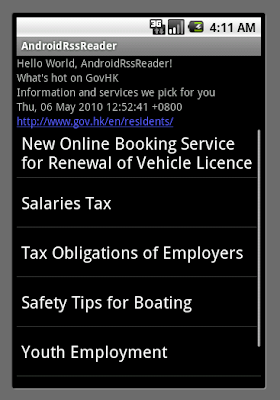
A simple RSS reader II, implement with RSSFeed & RSSItem

First of all, the source of the feed is changed to http://www.gov.hk/en/about/rss/govhkrss.data.xml, it's a feed from Hong Kong Government; because the original blogger's feed is too complicated for me to demo here!

Here, RSSHandler, RSSFeed and RSSItems are implemented as separated class for better organization. The application have a single object of RSSFeed class, which consist a list of RSSItem object. More details (Title, PubDate, Description and Link) of the feed and individual items are saved in the structure, which can be retrieved later.

AndroidManifest.xml to grant "android.permission.INTERNET" to the application. (Refer to last article "A simple RSS reader, using Android's org.xml.sax package")

Keep the rsslist.xml as before
<?xml version="1.0" encoding="utf-8"?>
<TextView
xmlns:android="http://schemas.android.com/apk/res/android"
android:id="@+id/rowtext"
android:layout_width="fill_parent"
android:layout_height="25px"
android:textSize="10sp" />


Modify main.xml
<?xml version="1.0" encoding="utf-8"?>
<LinearLayout xmlns:android="http://schemas.android.com/apk/res/android"
android:orientation="vertical"
android:layout_width="fill_parent"
android:layout_height="fill_parent"
>
<TextView
android:layout_width="fill_parent"
android:layout_height="wrap_content"
android:text="@string/hello" />
<TextView
android:layout_width="fill_parent"
android:layout_height="wrap_content"
android:id="@+id/feedtitle" />
<TextView
android:layout_width="fill_parent"
android:layout_height="wrap_content"
android:id="@+id/feeddescribtion" />
<TextView
android:layout_width="fill_parent"
android:layout_height="wrap_content"
android:id="@+id/feedpubdate" />
<TextView
android:layout_width="fill_parent"
android:layout_height="wrap_content"
android:autoLink="web"
android:id="@+id/feedlink" />
<ListView
android:id="@android:id/list"
android:layout_width="fill_parent"
android:layout_height="wrap_content" />
<TextView
android:id="@android:id/empty"
android:layout_width="fill_parent"
android:layout_height="wrap_content"
android:text="No Data" />
</LinearLayout>


Implement /src/com.exercise.AndroidRssReader/RSSItem.java
package com.exercise.AndroidRssReader;

public class RSSItem {

private String title = null;
private String description = null;
private String link = null;
private String pubdate = null;

RSSItem(){
}

void setTitle(String value)
{
title = value;
}
void setDescription(String value)
{
description = value;
}
void setLink(String value)
{
link = value;
}
void setPubdate(String value)
{
pubdate = value;
}

String getTitle()
{
return title;
}
String getDescription()
{
return description;
}
String getLink()
{
return link;
}
String getPubdate()
{
return pubdate;
}

@Override
public String toString() {
// TODO Auto-generated method stub
return title;
}
}


Implement /src/com.exercise.AndroidRssReader/RSSFeed.java
package com.exercise.AndroidRssReader;

import java.util.List;
import java.util.Vector;

public class RSSFeed {
private String title = null;
private String description = null;
private String link = null;
private String pubdate = null;
private List<RSSItem> itemList;

RSSFeed(){
itemList = new Vector<RSSItem>(0);
}

void addItem(RSSItem item){
itemList.add(item);
}

RSSItem getItem(int location){
return itemList.get(location);
}

List<RSSItem> getList(){
return itemList;
}

void setTitle(String value)
{
title = value;
}
void setDescription(String value)
{
description = value;
}
void setLink(String value)
{
link = value;
}
void setPubdate(String value)
{
pubdate = value;
}

String getTitle()
{
return title;
}
String getDescription()
{
return description;
}
String getLink()
{
return link;
}
String getPubdate()
{
return pubdate;
}

}


Implemenet /src/com.exercise.AndroidRssReader/RSSHandler.java
package com.exercise.AndroidRssReader;

import org.xml.sax.Attributes;
import org.xml.sax.SAXException;
import org.xml.sax.helpers.DefaultHandler;

public class RSSHandler extends DefaultHandler {

final int state_unknown = 0;
final int state_title = 1;
final int state_description = 2;
final int state_link = 3;
final int state_pubdate = 4;
int currentState = state_unknown;

RSSFeed feed;
RSSItem item;

boolean itemFound = false;

RSSHandler(){
}

RSSFeed getFeed(){
return feed;
}

@Override
public void startDocument() throws SAXException {
// TODO Auto-generated method stub
feed = new RSSFeed();
item = new RSSItem();

}

@Override
public void endDocument() throws SAXException {
// TODO Auto-generated method stub
}

@Override
public void startElement(String uri, String localName, String qName,
Attributes attributes) throws SAXException {
// TODO Auto-generated method stub

if (localName.equalsIgnoreCase("item")){
itemFound = true;
item = new RSSItem();
currentState = state_unknown;
}
else if (localName.equalsIgnoreCase("title")){
currentState = state_title;
}
else if (localName.equalsIgnoreCase("description")){
currentState = state_description;
}
else if (localName.equalsIgnoreCase("link")){
currentState = state_link;
}
else if (localName.equalsIgnoreCase("pubdate")){
currentState = state_pubdate;
}
else{
currentState = state_unknown;
}

}

@Override
public void endElement(String uri, String localName, String qName)
throws SAXException {
// TODO Auto-generated method stub
if (localName.equalsIgnoreCase("item")){
feed.addItem(item);
}
}

@Override
public void characters(char[] ch, int start, int length)
throws SAXException {
// TODO Auto-generated method stub

String strCharacters = new String(ch,start,length);

if (itemFound==true){
// "item" tag found, it's item's parameter
switch(currentState){
case state_title:
item.setTitle(strCharacters);
break;
case state_description:
item.setDescription(strCharacters);
break;
case state_link:
item.setLink(strCharacters);
break;
case state_pubdate:
item.setPubdate(strCharacters);
break;
default:
break;
}
}
else{
// not "item" tag found, it's feed's parameter
switch(currentState){
case state_title:
feed.setTitle(strCharacters);
break;
case state_description:
feed.setDescription(strCharacters);
break;
case state_link:
feed.setLink(strCharacters);
break;
case state_pubdate:
feed.setPubdate(strCharacters);
break;
default:
break;
}
}

currentState = state_unknown;
}


}


Modify /src/com.exercise.AndroidRssReader/AndroidRssReader.java
package com.exercise.AndroidRssReader;

import java.io.IOException;
import java.net.MalformedURLException;
import java.net.URL;
import javax.xml.parsers.ParserConfigurationException;
import javax.xml.parsers.SAXParser;
import javax.xml.parsers.SAXParserFactory;

import org.xml.sax.InputSource;
import org.xml.sax.SAXException;
import org.xml.sax.XMLReader;

import android.app.ListActivity;
import android.os.Bundle;
import android.widget.ArrayAdapter;
import android.widget.TextView;

public class AndroidRssReader extends ListActivity {

private RSSFeed myRssFeed = null;

/** Called when the activity is first created. */
@Override
public void onCreate(Bundle savedInstanceState) {
super.onCreate(savedInstanceState);
setContentView(R.layout.main);

try {
URL rssUrl = new URL("http://www.gov.hk/en/about/rss/govhkrss.data.xml");
SAXParserFactory mySAXParserFactory = SAXParserFactory.newInstance();
SAXParser mySAXParser = mySAXParserFactory.newSAXParser();
XMLReader myXMLReader = mySAXParser.getXMLReader();
RSSHandler myRSSHandler = new RSSHandler();
myXMLReader.setContentHandler(myRSSHandler);
InputSource myInputSource = new InputSource(rssUrl.openStream());
myXMLReader.parse(myInputSource);

myRssFeed = myRSSHandler.getFeed();

} catch (MalformedURLException e) {
// TODO Auto-generated catch block
e.printStackTrace();
} catch (ParserConfigurationException e) {
// TODO Auto-generated catch block
e.printStackTrace();
} catch (SAXException e) {
// TODO Auto-generated catch block
e.printStackTrace();
} catch (IOException e) {
// TODO Auto-generated catch block
e.printStackTrace();
}

if (myRssFeed!=null)
{
TextView feedTitle = (TextView)findViewById(R.id.feedtitle);
TextView feedDescribtion = (TextView)findViewById(R.id.feeddescribtion);
TextView feedPubdate = (TextView)findViewById(R.id.feedpubdate);
TextView feedLink = (TextView)findViewById(R.id.feedlink);
feedTitle.setText(myRssFeed.getTitle());
feedDescribtion.setText(myRssFeed.getDescription());
feedPubdate.setText(myRssFeed.getPubdate());
feedLink.setText(myRssFeed.getLink());

ArrayAdapter<RSSItem> adapter =
new ArrayAdapter<RSSItem>(this,
android.R.layout.simple_list_item_1,myRssFeed.getList());
setListAdapter(adapter);
}
}
}


Download the files.

Next: A simple RSS reader III, show details once item clicked.