Sunday, 4 July 2010

Example of AutoCompleteTextView

AutoCompleteTextView is an editable text view that shows completion suggestions automatically while the user is typing. The list of suggestions is displayed in a drop down menu from which the user can choose an item to replace the content of the edit box with.

AutoCompleteTextView

It can be comapred with "Example of MultiAutoCompleteTextView".

main.xml
<?xml version="1.0" encoding="utf-8"?>
<LinearLayout xmlns:android="http://schemas.android.com/apk/res/android"
android:orientation="vertical"
android:layout_width="fill_parent"
android:layout_height="fill_parent"
>
<TextView
android:layout_width="fill_parent"
android:layout_height="wrap_content"
android:text="@string/hello"
/>
<AutoCompleteTextView android:id="@+id/myautocomplete"
android:layout_width="fill_parent"
android:layout_height="wrap_content"
android:completionThreshold="1"
/>
</LinearLayout>


AndroidAutoCompleteTextView.java
package com.AndroidAutoCompleteTextView;

import android.app.Activity;
import android.os.Bundle;
import android.text.Editable;
import android.text.TextWatcher;
import android.widget.ArrayAdapter;
import android.widget.AutoCompleteTextView;

public class AndroidAutoCompleteTextView extends Activity implements TextWatcher{

AutoCompleteTextView myAutoComplete;
String item[]={
"January", "February", "March", "April",
"May", "June", "July", "August",
"September", "October", "November", "December"
};

/** Called when the activity is first created. */
@Override
public void onCreate(Bundle savedInstanceState) {
super.onCreate(savedInstanceState);
setContentView(R.layout.main);

myAutoComplete = (AutoCompleteTextView)findViewById(R.id.myautocomplete);

myAutoComplete.addTextChangedListener(this);
myAutoComplete.setAdapter(new ArrayAdapter<String>(this, android.R.layout.simple_dropdown_item_1line, item));

}

@Override
public void afterTextChanged(Editable arg0) {
// TODO Auto-generated method stub

}

@Override
public void beforeTextChanged(CharSequence s, int start, int count,
int after) {
// TODO Auto-generated method stub

}

@Override
public void onTextChanged(CharSequence s, int start, int before, int count) {
// TODO Auto-generated method stub

}
}

Saturday, 3 July 2010

How do I add Favicons to SeaMonkey?

Firefox LogoHow do I add favicons to the toolbar in Seamonkey? All the steps outlined on this SeaMonkey help page. Not the most straightforward way to do things, but still pretty easy.

Some examples of inputType on EditText

Some examples of InputType on EditText

<?xml version="1.0" encoding="utf-8"?>
<LinearLayout xmlns:android="http://schemas.android.com/apk/res/android"
android:orientation="vertical"
android:layout_width="fill_parent"
android:layout_height="fill_parent"
>
<TextView
android:layout_width="fill_parent"
android:layout_height="wrap_content"
android:text="@string/hello"
/>
<TextView
android:layout_width="fill_parent"
android:layout_height="wrap_content"
android:text="Ordinary EditText"
/>
<EditText
android:layout_width="fill_parent"
android:layout_height="wrap_content"
/>
<TextView
android:layout_width="fill_parent"
android:layout_height="wrap_content"
android:text="Password"
/>
<EditText
android:password="true"
android:layout_width="fill_parent"
android:layout_height="wrap_content"
/>
<TextView
android:layout_width="fill_parent"
android:layout_height="wrap_content"
android:text="Multi-ine"
/>
<EditText
android:inputType="text|textMultiLine"
android:minLines="3"
android:gravity="top"
android:layout_width="fill_parent"
android:layout_height="wrap_content"
/>
<TextView
android:layout_width="fill_parent"
android:layout_height="wrap_content"
android:text="Date"
/>
<EditText
android:inputType="date"
android:layout_width="fill_parent"
android:layout_height="wrap_content"
/>
<TextView
android:layout_width="fill_parent"
android:layout_height="wrap_content"
android:text="Signed Decimal Number"
/>
<EditText
android:inputType="number|numberSigned|numberDecimal"
android:layout_width="fill_parent"
android:layout_height="wrap_content"
/>
</LinearLayout>


Thursday, 1 July 2010

How will HTML 5 Change the Web? Look and See

Firefox LogoHow will HTML 5 change the web? Some of the Mozilla developers gave a presentation in London. Ajaxian has link to videos of the preso. Pretty cool stuff that would be done entirely in Flash today.

Display text file in /res/raw

Android can handle text file as raw.

Display text file in /res/raw

Create a text file, named hello.txt, and save it in the folder /res/raw. The files inside /res/raw will be traded as raw files, they will not be compiled. They will be moved to application package as they are.

main.xml
<?xml version="1.0" encoding="utf-8"?>
<LinearLayout xmlns:android="http://schemas.android.com/apk/res/android"
android:orientation="vertical"
android:layout_width="fill_parent"
android:layout_height="fill_parent"
>
<TextView
android:layout_width="fill_parent"
android:layout_height="wrap_content"
android:text="@string/hello"
/>
<TextView
android:id="@+id/hellotxt"
android:layout_width="fill_parent"
android:layout_height="wrap_content"
android:textSize="22px"
/>
</LinearLayout>


AndroidTxt.java
package com.exercise.AndroidTxt;

import java.io.ByteArrayOutputStream;
import java.io.IOException;
import java.io.InputStream;

import android.app.Activity;
import android.os.Bundle;
import android.widget.TextView;

public class AndroidTxt extends Activity {
/** Called when the activity is first created. */
@Override
public void onCreate(Bundle savedInstanceState) {
super.onCreate(savedInstanceState);
setContentView(R.layout.main);

TextView helloTxt = (TextView)findViewById(R.id.hellotxt);
helloTxt.setText(readTxt());
}

private String readTxt(){

InputStream inputStream = getResources().openRawResource(R.raw.hello);

ByteArrayOutputStream byteArrayOutputStream = new ByteArrayOutputStream();

int i;
try {
i = inputStream.read();
while (i != -1)
{
byteArrayOutputStream.write(i);
i = inputStream.read();
}
inputStream.close();
} catch (IOException e) {
// TODO Auto-generated catch block
e.printStackTrace();
}

return byteArrayOutputStream.toString();
}
}


Download the files.

Simple RSS Reader, with Options Menu to reload RSS

Further work on the exercise "Apply custom adapter to ListView for RSS Reader", a Options Menu is add to reload the RSS.
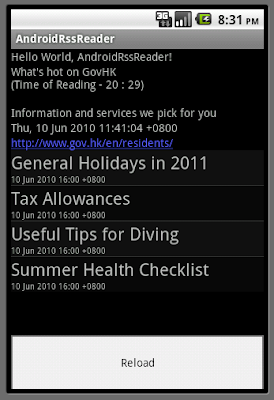
Simple RSS Reader, with Options Menu to reload RSS

Modify AndroidRssReader.java, move out the RSS code from onCreate() to a separated method, readRss().

Override onCreateOptionsMenu(Menu menu) to add the Options Menu, and also override onOptionsItemSelected(MenuItem item) to handle the function to call readRss() again.

AndroidRssReader.java
package com.exercise.AndroidRssReader;

import java.io.IOException;
import java.net.MalformedURLException;
import java.net.URL;
import java.util.Calendar;
import java.util.List;

import javax.xml.parsers.ParserConfigurationException;
import javax.xml.parsers.SAXParser;
import javax.xml.parsers.SAXParserFactory;

import org.xml.sax.InputSource;
import org.xml.sax.SAXException;
import org.xml.sax.XMLReader;

import android.app.ListActivity;
import android.content.Context;
import android.content.Intent;
import android.os.Bundle;
import android.view.LayoutInflater;
import android.view.Menu;
import android.view.MenuItem;
import android.view.View;
import android.view.ViewGroup;
import android.widget.ArrayAdapter;
import android.widget.ListView;
import android.widget.TextView;
import android.widget.Toast;

public class AndroidRssReader extends ListActivity {

private RSSFeed myRssFeed = null;

TextView feedTitle;
TextView feedDescribtion;
TextView feedPubdate;
TextView feedLink;

public class MyCustomAdapter extends ArrayAdapter<RSSItem> {

public MyCustomAdapter(Context context, int textViewResourceId,
List<RSSItem> list) {
super(context, textViewResourceId, list);
}

@Override
public View getView(int position, View convertView, ViewGroup parent) {
// TODO Auto-generated method stub
//return super.getView(position, convertView, parent);

View row = convertView;

if(row==null){
LayoutInflater inflater=getLayoutInflater();
row=inflater.inflate(R.layout.row, parent, false);
}

TextView listTitle=(TextView)row.findViewById(R.id.listtitle);
listTitle.setText(myRssFeed.getList().get(position).getTitle());
TextView listPubdate=(TextView)row.findViewById(R.id.listpubdate);
listPubdate.setText(myRssFeed.getList().get(position).getPubdate());

if (position%2 == 0){
listTitle.setBackgroundColor(0xff101010);
listPubdate.setBackgroundColor(0xff101010);
}
else{
listTitle.setBackgroundColor(0xff080808);
listPubdate.setBackgroundColor(0xff080808);
}

return row;
}
}

/** Called when the activity is first created. */
@Override
public void onCreate(Bundle savedInstanceState) {
super.onCreate(savedInstanceState);
setContentView(R.layout.main);

feedTitle = (TextView)findViewById(R.id.feedtitle);
feedDescribtion = (TextView)findViewById(R.id.feeddescribtion);
feedPubdate = (TextView)findViewById(R.id.feedpubdate);
feedLink = (TextView)findViewById(R.id.feedlink);

readRss();
}

private void readRss(){

feedTitle.setText("--- wait ---");
feedDescribtion.setText("");
feedPubdate.setText("");
feedLink.setText("");
setListAdapter(null);

Toast.makeText(this, "Reading RSS, Please wait.", Toast.LENGTH_LONG).show();

try {
URL rssUrl = new URL("http://www.gov.hk/en/about/rss/govhkrss.data.xml");
SAXParserFactory mySAXParserFactory = SAXParserFactory.newInstance();
SAXParser mySAXParser = mySAXParserFactory.newSAXParser();
XMLReader myXMLReader = mySAXParser.getXMLReader();
RSSHandler myRSSHandler = new RSSHandler();
myXMLReader.setContentHandler(myRSSHandler);
InputSource myInputSource = new InputSource(rssUrl.openStream());
myXMLReader.parse(myInputSource);

myRssFeed = myRSSHandler.getFeed();

} catch (MalformedURLException e) {
// TODO Auto-generated catch block
e.printStackTrace();
} catch (ParserConfigurationException e) {
// TODO Auto-generated catch block
e.printStackTrace();
} catch (SAXException e) {
// TODO Auto-generated catch block
e.printStackTrace();
} catch (IOException e) {
// TODO Auto-generated catch block
e.printStackTrace();
}

if (myRssFeed!=null)
{
Calendar c = Calendar.getInstance();
String strCurrentTiime = "\n(Time of Reading - "
+ c.get(Calendar.HOUR_OF_DAY)
+ " : "
+ c.get(Calendar.MINUTE) + ")\n";

feedTitle.setText(myRssFeed.getTitle() + strCurrentTiime);
feedDescribtion.setText(myRssFeed.getDescription());
feedPubdate.setText(myRssFeed.getPubdate());
feedLink.setText(myRssFeed.getLink());

MyCustomAdapter adapter =
new MyCustomAdapter(this, R.layout.row, myRssFeed.getList());
setListAdapter(adapter);

}
}

@Override
protected void onListItemClick(ListView l, View v, int position, long id) {
// TODO Auto-generated method stub
Intent intent = new Intent(this,ShowDetails.class);
Bundle bundle = new Bundle();
bundle.putString("keyTitle", myRssFeed.getItem(position).getTitle());
bundle.putString("keyDescription", myRssFeed.getItem(position).getDescription());
bundle.putString("keyLink", myRssFeed.getItem(position).getLink());
bundle.putString("keyPubdate", myRssFeed.getItem(position).getPubdate());
intent.putExtras(bundle);
startActivity(intent);
}

@Override
public boolean onCreateOptionsMenu(Menu menu) {
// TODO Auto-generated method stub
menu.add(0, 0, 0, "Reload");
return true;
}

@Override
public boolean onOptionsItemSelected(MenuItem item) {
// TODO Auto-generated method stub
switch(item.getItemId()){
case (0): readRss();
break;
default:
break;
}

return true;
}
}


Download the files.

next: Read RSS in background, using AsyncTask


android.graphics.Color

The Color class defines methods for creating and converting color ints. Colors are represented as packed ints, made up of 4 bytes: alpha, red, green, blue. The values are unpremultiplied, meaning any transparency is stored solely in the alpha component, and not in the color components. The components are stored as follows (alpha << 24) | (red << 16) | (green << 8) | blue. Each component ranges between 0..255 with 0 meaning no contribution for that component, and 255 meaning 100% contribution. Thus opaque-black would be 0xFF000000 (100% opaque but no contributes from red, gree, blue, and opaque-white would be 0xFFFFFFFF.

android.graphics.Color

main.xml
<?xml version="1.0" encoding="utf-8"?>
<LinearLayout xmlns:android="http://schemas.android.com/apk/res/android"
android:orientation="vertical"
android:layout_width="fill_parent"
android:layout_height="fill_parent"
>
<TextView
android:layout_width="fill_parent"
android:layout_height="wrap_content"
android:text="@string/hello"
/>
<LinearLayout
android:id="@+id/background"
android:orientation="vertical"
android:layout_width="fill_parent"
android:layout_height="fill_parent"
>
<Spinner
android:id="@+id/colorspinner"
android:layout_width="fill_parent"
android:layout_height="wrap_content"
/>
</LinearLayout>
</LinearLayout>


AndroidColor.java
package com.exercise.AndroidColor;

import android.app.Activity;
import android.graphics.Color;
import android.os.Bundle;
import android.view.View;
import android.widget.AdapterView;
import android.widget.ArrayAdapter;
import android.widget.LinearLayout;
import android.widget.Spinner;
import android.widget.Toast;

public class AndroidColor extends Activity {

LinearLayout background;
Spinner spinnerColor;

private static final String[] color =
{ "BLACK",
"BLUE",
"CYAN",
"DKGRAY",
"GRAY",
"GREEN",
"LTGRAY",
"MAGENTA",
"RED",
"TRANSPARENT",
"WHITE",
"YELLOW"};
private ArrayAdapter<String> adapter;

/** Called when the activity is first created. */
@Override
public void onCreate(Bundle savedInstanceState) {
super.onCreate(savedInstanceState);
setContentView(R.layout.main);

background = (LinearLayout)findViewById(R.id.background);

spinnerColor = (Spinner)findViewById(R.id.colorspinner);
adapter = new ArrayAdapter<String>(this,
android.R.layout.simple_spinner_item, color);
adapter.setDropDownViewResource(
android.R.layout.simple_spinner_dropdown_item);
spinnerColor.setAdapter(adapter);
spinnerColor.setSelection(0);

spinnerColor.setOnItemSelectedListener(
new Spinner.OnItemSelectedListener(){

@Override
public void onItemSelected(AdapterView<?> arg0, View arg1,
int arg2, long arg3) {
// TODO Auto-generated method stub
setBackgroundColor(spinnerColor.getSelectedItem().toString());
}

@Override
public void onNothingSelected(AdapterView<?> arg0) {
// TODO Auto-generated method stub

}});
}


private void setBackgroundColor(String strColor){
Toast.makeText(this, strColor, Toast.LENGTH_LONG).show();
if (strColor == "BLACK"){
background.setBackgroundColor(Color.BLACK);
}else if(strColor=="BLUE"){
background.setBackgroundColor(Color.BLUE);
}else if(strColor=="CYAN"){
background.setBackgroundColor(Color.CYAN);
}else if(strColor=="DKGRAY"){
background.setBackgroundColor(Color.DKGRAY);
}else if(strColor=="GRAY"){
background.setBackgroundColor(Color.GRAY);
}else if(strColor=="GREEN"){
background.setBackgroundColor(Color.GREEN);
}else if(strColor=="LTGRAY"){
background.setBackgroundColor(Color.LTGRAY);
}else if(strColor=="MAGENTA"){
background.setBackgroundColor(Color.MAGENTA);
}else if(strColor=="RED"){
background.setBackgroundColor(Color.RED);
}else if(strColor=="TRANSPARENT"){
background.setBackgroundColor(Color.TRANSPARENT);
}else if(strColor=="WHITE"){
background.setBackgroundColor(Color.WHITE);
}else if(strColor=="YELLOW"){
background.setBackgroundColor(Color.YELLOW);
}
}
}


Download the files.