It's modified to display lifecycle using the same technique.
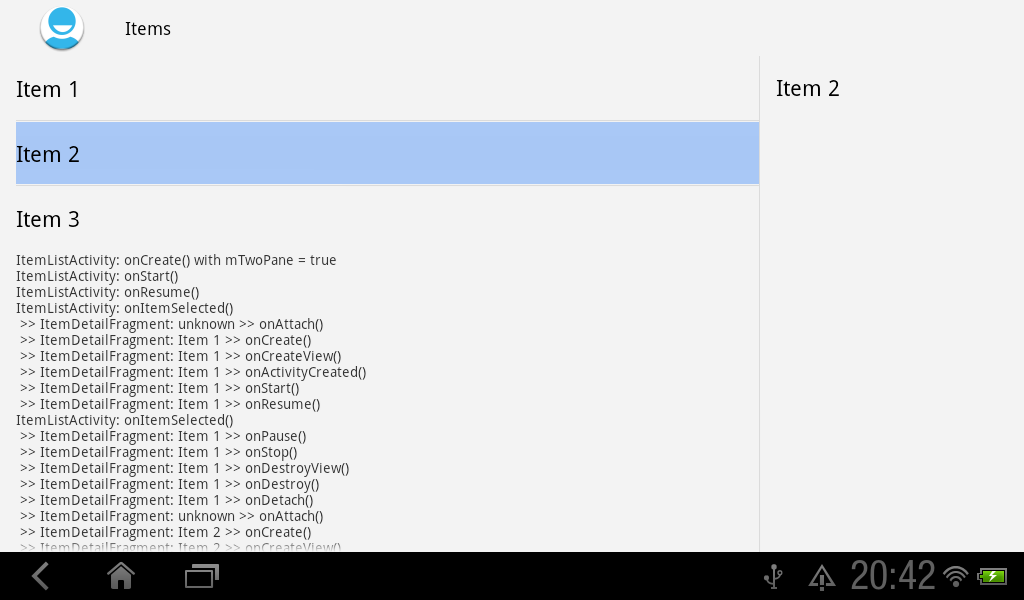
- Create a HelloWorld of MasterDetailFlow, with Minimum Required SDK of API 11 Android 3.0 (Honeycomb) and Build SDK of Android 4.1 (API 16).
- Modify activity_item_twopane.xml to add a TextView to display the status. It's the layout on tablet.
<LinearLayout xmlns:android="http://schemas.android.com/apk/res/android"
    xmlns:tools="http://schemas.android.com/tools"
    android:orientation="horizontal"
    android:layout_width="match_parent"
    android:layout_height="match_parent"
    android:layout_marginLeft="16dp"
    android:layout_marginRight="16dp"
    android:divider="?android:attr/dividerHorizontal"
    android:showDividers="middle"
    tools:context=".ItemListActivity">

    <LinearLayout
        android:layout_width="0dp"
        android:layout_height="match_parent"
        android:layout_weight="3"
        android:orientation="vertical"
        >
        <fragment android:name="com.example.helloworld.ItemListFragment"
        android:id="@+id/item_list"
        android:layout_width="match_parent"
        android:layout_height="wrap_content"/>
        <ScrollView
            android:layout_width="match_parent"
            android:layout_height="match_parent">
            <TextView
                android:id="@+id/status"
                android:layout_width="match_parent"
                android:layout_height="match_parent"
                android:text="status"/>

        </ScrollView>
    </LinearLayout>

    <FrameLayout android:id="@+id/item_detail_container"
        android:layout_width="0dp"
        android:layout_height="match_parent"
        android:layout_weight="1" />

</LinearLayout>
- Modify ItemListActivity.java to implement updateMyStatus() and updateStatus() methods, and display lifecycle.
package com.example.helloworld;

import android.content.Intent;
import android.os.Bundle;
import android.support.v4.app.FragmentActivity;
import android.support.v4.app.NavUtils;
import android.view.MenuItem;
import android.widget.TextView;

public class ItemListActivity extends FragmentActivity
        implements ItemListFragment.Callbacks {

    private boolean mTwoPane;

    String myStatus = "";
    TextView status;

    @Override
    public void onCreate(Bundle savedInstanceState) {
        super.onCreate(savedInstanceState);
        setContentView(R.layout.activity_item_list);

        if (findViewById(R.id.item_detail_container) != null) {
            mTwoPane = true;
            ((ItemListFragment) getSupportFragmentManager()
                    .findFragmentById(R.id.item_list))
                    .setActivateOnItemClick(true);
        }

        status = (TextView)findViewById(R.id.status);
        updateMyStatus("onCreate() with mTwoPane = " + String.valueOf(mTwoPane));
    }

    private void updateMyStatus(String myst){
     updateStatus("ItemListActivity: " + myst);
    }

    public void updateStatus(String st){
     if(status == null){
      myStatus += "delay - " + st + "\n";
     }else{
      myStatus += st + "\n";
      status.setText(myStatus);
     }
    }

    @Override
    public void onItemSelected(String id) {
        if (mTwoPane) {
            Bundle arguments = new Bundle();
            arguments.putString(ItemDetailFragment.ARG_ITEM_ID, id);
            ItemDetailFragment fragment = new ItemDetailFragment();
            fragment.setArguments(arguments);
            getSupportFragmentManager().beginTransaction()
                    .replace(R.id.item_detail_container, fragment)
                    .commit();

        } else {
            Intent detailIntent = new Intent(this, ItemDetailActivity.class);
            detailIntent.putExtra(ItemDetailFragment.ARG_ITEM_ID, id);
            startActivity(detailIntent);
        }

        updateMyStatus("onItemSelected()");
    }

 @Override
 protected void onDestroy() {
  // TODO Auto-generated method stub
  super.onDestroy();
  updateMyStatus("onDestroy()");
 }

 @Override
 protected void onPause() {
  // TODO Auto-generated method stub
  super.onPause();
  updateMyStatus("onPause()");
 }

 @Override
 protected void onResume() {
  // TODO Auto-generated method stub
  super.onResume();
  updateMyStatus("onResume()");
 }

 @Override
 protected void onStart() {
  // TODO Auto-generated method stub
  super.onStart();
  updateMyStatus("onStart()");
 }

 @Override
 protected void onStop() {
  // TODO Auto-generated method stub
  super.onStop();
  updateMyStatus("onStop()");
 }

}
- Modify ItemDetailFragment.java
package com.example.helloworld;

import com.example.helloworld.dummy.DummyContent;

import android.app.Activity;
import android.os.Bundle;
import android.support.v4.app.Fragment;
import android.view.LayoutInflater;
import android.view.View;
import android.view.ViewGroup;
import android.widget.TextView;

public class ItemDetailFragment extends Fragment {

    public static final String ARG_ITEM_ID = "item_id";

    DummyContent.DummyItem mItem;

    public ItemDetailFragment() {
    }

    @Override
    public void onCreate(Bundle savedInstanceState) {
        super.onCreate(savedInstanceState);
        if (getArguments().containsKey(ARG_ITEM_ID)) {
            mItem = DummyContent.ITEM_MAP.get(getArguments().getString(ARG_ITEM_ID));
        }

        updateMyStatus("onCreate()");
    }

    @Override
    public View onCreateView(LayoutInflater inflater, ViewGroup container,
            Bundle savedInstanceState) {
        View rootView = inflater.inflate(R.layout.fragment_item_detail, container, false);
        if (mItem != null) {
            ((TextView) rootView.findViewById(R.id.item_detail)).setText(mItem.content);
        }

        updateMyStatus("onCreateView()");

        return rootView;
    }

    private void updateMyStatus(String myst){
     if(getActivity().getClass() == ItemListActivity.class){

      String me;

      if(mItem == null){
       me = "unknown";
      }else{
       me = mItem.content;
      }

      ((ItemListActivity)getActivity()).updateStatus(" >> ItemDetailFragment: "
        + me + " >> "
        + myst);
     }
    }

 @Override
 public void onActivityCreated(Bundle savedInstanceState) {
  // TODO Auto-generated method stub
  super.onActivityCreated(savedInstanceState);
  updateMyStatus("onActivityCreated()");
 }

 @Override
 public void onAttach(Activity activity) {
  // TODO Auto-generated method stub
  super.onAttach(activity);
  updateMyStatus("onAttach()");
 }

 @Override
 public void onDestroy() {
  // TODO Auto-generated method stub
  super.onDestroy();
  updateMyStatus("onDestroy()");
 }

 @Override
 public void onDestroyView() {
  // TODO Auto-generated method stub
  super.onDestroyView();
  updateMyStatus("onDestroyView()");
 }

 @Override
 public void onDetach() {
  // TODO Auto-generated method stub
  super.onDetach();
  updateMyStatus("onDetach()");
 }

 @Override
 public void onPause() {
  // TODO Auto-generated method stub
  super.onPause();
  updateMyStatus("onPause()");
 }

 @Override
 public void onResume() {
  // TODO Auto-generated method stub
  super.onResume();
  updateMyStatus("onResume()");
 }

 @Override
 public void onStart() {
  // TODO Auto-generated method stub
  super.onStart();
  updateMyStatus("onStart()");
 }

 @Override
 public void onStop() {
  // TODO Auto-generated method stub
  super.onStop();
  updateMyStatus("onStop()");
 }

}
Please note that this exercise is applied on tablet version only.
 Download the files.


