A follow up to my last post. A List Apart has this post on using DOCTYPE processing instruction in your HTML files. A listing of all the various types you should use is included. Very helpful.
Thursday, 11 September 2008

10 Tips From CSS Masters

I found this link on Ajaxian today listing 10 tips from CSS masters. Most of the tips seem pretty good. I haven't been putting my CSS rules on 1 line. I kind of like that. Also the trick for clearing the float looks quite cool.
Wednesday, 10 September 2008
Acer Aspire One: enable the xfce4 'right click menu'
To enable the right click menu so common and loved by we users of Xfce (the window manager that ships with the Acer Aspire One) perform the following:
Select the 'My Files' icon in the Files menu box:
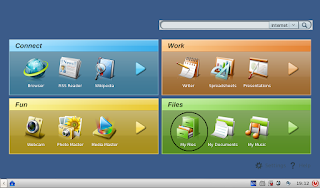
Select 'File'
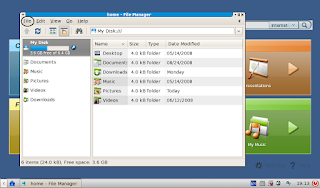
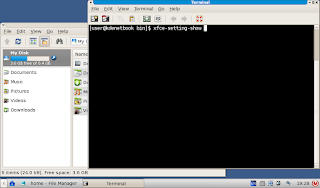
In the pull down menu select Terminal and in the terminal window type xfce-setting-show to bring up the settings window
Select Desktop in the Xfce Setting Manager
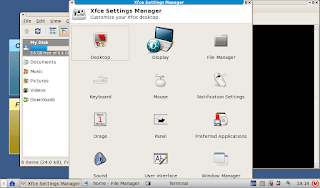
Select the Behavior tab and check the box labeled Show desktop menu on right click
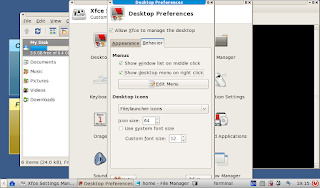
And there you have it! No need to reboot, just enjoy the Xfce menu when right clicking on the desk top.
Select the 'My Files' icon in the Files menu box:

Select 'File'

In the pull down menu select Terminal and in the terminal window type xfce-setting-show to bring up the settings window

Select Desktop in the Xfce Setting Manager

Select the Behavior tab and check the box labeled Show desktop menu on right click

And there you have it! No need to reboot, just enjoy the Xfce menu when right clicking on the desk top.
Deleting NetBeans Java DB Configuration Files

I'm working on updating one of our EJB courses and I needed to add a Java DB database to my machine so I could deploy an Enterprise Application. Of course, in my first attempt to create the database, I completely hosed it. Consequently, I needed to delete it and start over. Now this isn't very easy cause a bunch of configuration files get created when you create a Java DB database with NetBeans. So here is what I learned from my little escapade.
DB Settings for an EJB Container
This is where I should have gone first but didn't. All the information about databases for an EJB project can be found in: project-ejb\setup\sun-resources.xml. This file shows the database name, user name, password, port number, etc... Go here first if you need to figure out this information when it isn't provided to you.
Location of Derby Directory
Java DB is based off of the Apache Derby open source database project. So the database files are stored in a Derby directory. But where? On Windows you can find the directory here: C:\Documents and Settings\UserName\.netbeans-derby. You will find a directory for each Java DB database you have created. To delete the database, just delete the directory.
Delete old Database Connections from NetBeans
When you create a Java DB database, NetBeans automatically creates a connection for that DB. Now you should be able to delete the connection from the UI by right clicking it and selecting delete. For whatever reason, that was not working for me. So I had to find where this list was stored. I found it here on Windows: C:\Documents and Settings\UserName\.netbeans\6.1\config\Databases\Connections. Each connection is stored in an XML file. Delete the file and the connection is removed. You may need to restart NetBeans to see the connection removed from the UI.
This sums up my little adventure. After installing the database with the correct user name and password, deployment was a breeze. Woo hoo!
Tuesday, 9 September 2008
Blogger Tips and Tricks - enlarging the text area
Disappointed with the standard blog templates? Text area too small? Well with just a few changes to your blog template you can make your blog much more laptop friendly (wider) by hand tweaking any template. Here's how:
Select 'Layout' -> 'Edit HTML'
Then modify the following lines in your template.
#header-wrapper {
width:1024px; margin:0 auto 10px;
border:1px solid $bordercolor;
}
#outer-wrapper {
width: 1024px; margin:0 auto;
padding:10px;
text-align:$startSide;
font: $bodyfont;
}
#main-wrapper {
width: 800px; float: $startSide;
word-wrap: break-word; /* fix for long text breaking sidebar float in IE */
overflow: hidden; /* fix for long non-text content breaking IE sidebar float */
}
#sidebar-wrapper {
width: 200px;
float: $endSide;
word-wrap: break-word; /* fix for long text breaking sidebar float in IE */
overflow: hidden; /* fix for long non-text content breaking IE sidebar float */
}
Select 'Layout' -> 'Edit HTML'
Then modify the following lines in your template.
#header-wrapper {
width:1024px; margin:0 auto 10px;
border:1px solid $bordercolor;
}
#outer-wrapper {
width: 1024px; margin:0 auto;
padding:10px;
text-align:$startSide;
font: $bodyfont;
}
#main-wrapper {
width: 800px; float: $startSide;
word-wrap: break-word; /* fix for long text breaking sidebar float in IE */
overflow: hidden; /* fix for long non-text content breaking IE sidebar float */
}
#sidebar-wrapper {
width: 200px;
float: $endSide;
word-wrap: break-word; /* fix for long text breaking sidebar float in IE */
overflow: hidden; /* fix for long non-text content breaking IE sidebar float */
}
Monday, 8 September 2008
JavaScript Pacman
Kris over at digitalinsane.com has written an all JavaScript Pacman using the YUI toolkit. Its not perfect, everything moves too fast on my MacPro with Firefox 3. But it is impressive nonetheless.
Featured gadget: Pipes

Name: Pipes
Author: Paul Unger
Description: A join-the-pipes time waster
More information | Download gadget
Each week this blog features a recently added Google Desktop gadget that looks promising. If you'd like to see all new Desktop gadgets as they're published, subscribe to the RSS feed.
Subscribe to:
Posts (Atom)