Tuesday, 26 April 2011

New Fujitsu LIFEBOOK SH560 Review

New Fujitsu LIFEBOOK SH560 Review
Maximum 56Kbps performance varies according to your local service providers� services as well as line condition. V.92 performance is dependent on local service providers� services

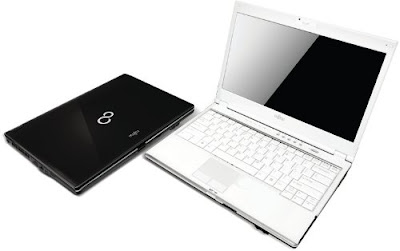
The brand new Fujitsu LIFEBOOK SH560 is tailor-made for urbane individuals seeking mobility and functionality. Boasting key features such as mobility, connectivity, versatility and unprecedented security to the next level, the SH560 has all the essential qualities as a perfect personal companion.FUJITSU LifeBook SH560 329x300 pictureNew Fujitsu LIFEBOOK SH560

  • 13.3-inch notebook at approximately 1.8kg* for professional mobility
  • Unique Scroll Wheel design for convenient scrolling for web pages or lengthy documents
  • Optimal user-friendliness with the new Keycap Keyboard and USB-charging function for mobile devices
  • Achieve extended battery life for mobile computing through the ECO Button
  • Health and Environment friendliness with RoHS compliance10
  • With weight saver option only.

Results obtained from BAPCo� MobileMark� 2007(Productivity Workload) performed on systems with maximum battery life settings under laboratory testing environment. Actual battery life will vary based on screen brightness, sound volume settings, running applications, connected peripherals, power management settings, battery conditioning, and other customer preferences in the real life situation. Built-in bay device or hard drive usage may also have a significant impact on battery life. Note: Battery life is based on Intel� Core� i3-330M processor with Intel� HD graphics for SH560.


Specifications
Platform Core� i5-460M processor 2.53GHz with Turbo Boost up to 2.80GHz
Intel� Core� i3-370M Processor
Intel� Pentium�Processor P6100
Intel�QM57 Express Chipset
Operating System16 Genuine Windows� 7 Professional
(or Genuine Windows� 7 Home Premium)
(or Genuine Windows� 7 Home Basic17)
Display15 13.3-inch SuperFine HD back-light LED 200nits, 1366 x 768 pixels
Modular Bay Device Dual Layer DVD Super Multi Writer9
Memory 2GB DDR3 1066MHz
Max. Memory Supported14- 8GB DDR3 1066MHz, Dual Channel
Hard Disk 320GB
Battery Up to 5hrs1(6cell Li-ion 5200mAh)
Weight Approx. 1.8kg (w/ weight saver option)
Detailed Specifications
Hard Disk Drive SATA-150 5400rpm, S.M.A.R.T support, Two Partitions � 50/5013
Graphics NVIDIA GeForce 310M with dedicated video memory of 512MB
Intel� HD Graphic
High Definition (HD) Audio RealTek ALC269 HD audio codec with Dual Built-in Stereo Speakers and Dual Built-in Stereo Microphone
HD Audio-in: External Mic-in
HD Audio-out: Headphone-out
Communication 1.3 Mega Pixel camera, Bluetooth� 1000/100/10Mbps4 Gigabit Ethernet PCI Express� x 1 and Atheros WLAN 802.11BGN wireless network connection. Separate ON/OFF switch for wireless network connection.
User Interface Spill-resistant Keyboard12: 84-key, 19mm key pitch, 2.7mm key stroke Independent ergonomic Scroll Wheel that perfectly fit with finger Intelligent Touch Pad with configurable vertical and horizontal scroll functions
Card Slots ExpressCard�/34/54, Secured Digital / SDHC
Connector Interface USB 2.0 x 3, VGA (external display), RJ45 (LAN), HDMI, HDA-in, HDA-out, Power Adapter DC-in
Quick Launch Panel Five Programmable Application Launch Buttons (Support, Mail, Internet, ECO and Camera button)
Security8 BIOS Lock, Hard Disk Lock, Anti-theft Lock Slot
Dimensions 316mm (W) x 227mm (D) x 27.9/35.8mm (H
Colours5 Urban White / Ebony Black
Bundled Accessories
AC Adapter Input AC 100~240V, Output DC 19V 80W
Bundled Softwares CyberLink PowerDVD�, CyberLink PowerDirector�, Roxio Easy Media Creator, Adobe Acrobat Reader, Fujitsu UpdateNavi6, Fujitsu Power Saving Utility, Fujitsu Hardware Diagnostic Tool, Fujitsu Display Manager, Sun Microsystems Java Runtime, CyberLink YouCam�, Windows Live Essentials (Windows Live Messenger, Windows Photo Gallery, Windows Live Mail, Windows Live Call, Windows Live Writer) Microsoft Office Professional 2007 60-day Convertible Trial7, Symantec Internet Security 60 days trial, Purchase Office Product Key to activate Office 2010 preloaded on this PC7
Optional Accessories
Modular Bay Options Replaceable with
- Bay Battery, 6cell Li-ion 2500mAh, up to 9hrs1 battery life (Standard + Bay Batteries)
Dual Layer DVD Super Multi writer9
- Weight Saver


Source : [http://celeronlaptops.com/search/fujitsu-sh560/]

Monday, 25 April 2011

B&N NookColor graduates to big boy pants, brings apps and Flash

Well... It looks like the NookColor has just graduated to big boy pants. Today, Barnes and Noble has released version 1.2 of their software with full Android support. This includes an e-mail client, contact manager, and app store. Basically, many of the features you would get with the iPad but at only a $249 sticker price. Pretty sweet if you have not dipped your toe in the tablet lake yet.


Up until today, the NookColor was primarily a Wifi color ebook reader with a very nice web browser. But unlike the Kindle, the NookColor has always been a little more. It has a touch interface with an color LCD screen which makes it closer to an iPad than a Kindle. It is about the same size as a Kindle (a little bigger) and weights a bit more (around 1 pound). From what I can tell, book prices are about the same as Amazon.com and selection is similar. Haven't tested battery life yet, but is supposed to be similar to an iPad. Oh and one other thing... No syncing with iTunes! Yay! A device that is actually designed to work stand alone.


With today's update, the NookColor is now firmly in the iPad category of tablets. So if you have been looking to try a tablet, but don't have $600 for an iPad, you may want to give this a look. Click the picture if you want to buy one from me. :)


Engadget has all the details on todays update:

B&N Nook Color update released, brings Froyo, apps, and Flash, we go hands-on (video) -- Engadget

Read EXIF of JPG file

Work on the exercise "Display Gallery selected image using BitmapFactory", function of reading EXIF is added.

EXIF of JPG file

A new class MyExif is implemented to handle the operation on the JPG file, it's used to read EXIF. (May be more functions will be added later)

Note that it's target for API Level 8, Android 2.2, other version will provide more or less TAG of EXIF.

MyExif.java
package com.exercise.AndroidSelectImage;

import java.io.File;
import java.io.IOException;
import android.app.Activity;
import android.database.Cursor;
import android.media.ExifInterface;
import android.net.Uri;
import android.provider.MediaStore;

public class MyExif {

private File exifFile; //It's the file passed from constructor
private String exifFilePath; //file in Real Path format
private Activity parentActivity; //Parent Activity

private String exifFilePath_withoutext;
private String ext;

private ExifInterface exifInterface;
private Boolean exifValid = false;;

//Exif TAG
//for API Level 8, Android 2.2
private String exif_DATETIME = "";
private String exif_FLASH = "";
private String exif_FOCAL_LENGTH = "";
private String exif_GPS_DATESTAMP = "";
private String exif_GPS_LATITUDE = "";
private String exif_GPS_LATITUDE_REF = "";
private String exif_GPS_LONGITUDE = "";
private String exif_GPS_LONGITUDE_REF = "";
private String exif_GPS_PROCESSING_METHOD = "";
private String exif_GPS_TIMESTAMP = "";
private String exif_IMAGE_LENGTH = "";
private String exif_IMAGE_WIDTH = "";
private String exif_MAKE = "";
private String exif_MODEL = "";
private String exif_ORIENTATION = "";
private String exif_WHITE_BALANCE = "";

//Constructor from path
MyExif(String fileString, Activity parent){
exifFile = new File(fileString);
parentActivity = parent;
exifFilePath = fileString;
PrepareExif();
}

//Constructor from URI
MyExif(Uri fileUri, Activity parent){
exifFile = new File(fileUri.toString());
parentActivity = parent;
exifFilePath = getRealPathFromURI(fileUri);
PrepareExif();
}

private void PrepareExif(){

int dotposition= exifFilePath.lastIndexOf(".");
exifFilePath_withoutext = exifFilePath.substring(0,dotposition);
ext = exifFilePath.substring(dotposition + 1, exifFilePath.length());

if (ext.equalsIgnoreCase("jpg")){
try {
exifInterface = new ExifInterface(exifFilePath);
ReadExifTag();
exifValid = true;
} catch (IOException e) {
// TODO Auto-generated catch block
e.printStackTrace();
}
}
}

private void ReadExifTag(){

exif_DATETIME = exifInterface.getAttribute(ExifInterface.TAG_DATETIME);
exif_FLASH = exifInterface.getAttribute(ExifInterface.TAG_FLASH);
exif_FOCAL_LENGTH = exifInterface.getAttribute(ExifInterface.TAG_FOCAL_LENGTH);
exif_GPS_DATESTAMP = exifInterface.getAttribute(ExifInterface.TAG_GPS_DATESTAMP);
exif_GPS_LATITUDE = exifInterface.getAttribute(ExifInterface.TAG_GPS_LATITUDE);
exif_GPS_LATITUDE_REF = exifInterface.getAttribute(ExifInterface.TAG_GPS_LATITUDE_REF);
exif_GPS_LONGITUDE = exifInterface.getAttribute(ExifInterface.TAG_GPS_LONGITUDE);
exif_GPS_LONGITUDE_REF = exifInterface.getAttribute(ExifInterface.TAG_GPS_LONGITUDE_REF);
exif_GPS_PROCESSING_METHOD = exifInterface.getAttribute(ExifInterface.TAG_GPS_PROCESSING_METHOD);
exif_GPS_TIMESTAMP = exifInterface.getAttribute(ExifInterface.TAG_GPS_TIMESTAMP);
exif_IMAGE_LENGTH = exifInterface.getAttribute(ExifInterface.TAG_IMAGE_LENGTH);
exif_IMAGE_WIDTH = exifInterface.getAttribute(ExifInterface.TAG_IMAGE_WIDTH);
exif_MAKE = exifInterface.getAttribute(ExifInterface.TAG_MAKE);
exif_MODEL = exifInterface.getAttribute(ExifInterface.TAG_MODEL);
exif_ORIENTATION = exifInterface.getAttribute(ExifInterface.TAG_ORIENTATION);
exif_WHITE_BALANCE = exifInterface.getAttribute(ExifInterface.TAG_WHITE_BALANCE);

}

private String getRealPathFromURI(Uri contentUri) {
String[] proj = { MediaStore.Images.Media.DATA };
Cursor cursor = parentActivity.managedQuery(contentUri, proj, null, null, null);
int column_index = cursor.getColumnIndexOrThrow(MediaStore.Images.Media.DATA);
cursor.moveToFirst();
return cursor.getString(column_index);
}

public String getSummary(){
if(!exifValid){
return ("Invalide EXIF!");
}else{
return( exifFilePath + " : \n" +

"Name without extension: " + exifFilePath_withoutext + "\n" +
"with extension: " + ext + "\n" +

"Date Time: " + exif_DATETIME + "\n" +
"Flash: " + exif_FLASH + "\n" +
"Focal Length: " + exif_FOCAL_LENGTH + "\n" +
"GPS Date Stamp: " + exif_GPS_DATESTAMP + "\n" +
"GPS Latitude: " + exif_GPS_LATITUDE + "\n" +
"GPS Latitute Ref: " + exif_GPS_LATITUDE_REF + "\n" +
"GPS Longitude: " + exif_GPS_LONGITUDE + "\n" +
"GPS Longitude Ref: " + exif_GPS_LONGITUDE_REF + "\n" +
"Processing Method: " + exif_GPS_PROCESSING_METHOD + "\n" +
"GPS Time Stamp: " + exif_GPS_TIMESTAMP + "\n" +
"Image Length: " + exif_IMAGE_LENGTH + "\n" +
"Image Width: " + exif_IMAGE_WIDTH + "\n" +
"Make: " + exif_MAKE + "\n" +
"Model: " + exif_MODEL + "\n" +
"Orientation: " + exif_ORIENTATION + "\n" +
"White Balance: " + exif_WHITE_BALANCE + "\n");
}
}
}


AndroidSelectImage.java
package com.exercise.AndroidSelectImage;

import java.io.File;
import java.io.FileNotFoundException;
import android.app.Activity;
import android.content.Intent;
import android.graphics.Bitmap;
import android.graphics.BitmapFactory;
import android.net.Uri;
import android.os.Bundle;
import android.view.View;
import android.widget.Button;
import android.widget.ImageView;
import android.widget.TextView;

public class AndroidSelectImage extends Activity {

TextView textTargetUri;
ImageView targetImage;

File targetFile;
String exifAttribute;

/** Called when the activity is first created. */
@Override
public void onCreate(Bundle savedInstanceState) {
super.onCreate(savedInstanceState);
setContentView(R.layout.main);
Button buttonLoadImage = (Button)findViewById(R.id.loadimage);
textTargetUri = (TextView)findViewById(R.id.targeturi);
targetImage = (ImageView)findViewById(R.id.targetimage);

buttonLoadImage.setOnClickListener(new Button.OnClickListener(){

@Override
public void onClick(View arg0) {
// TODO Auto-generated method stub
Intent intent = new Intent(Intent.ACTION_PICK,
android.provider.MediaStore.Images.Media.EXTERNAL_CONTENT_URI);
startActivityForResult(intent, 0);
}});
}

@Override
protected void onActivityResult(int requestCode,
int resultCode, Intent data) {
// TODO Auto-generated method stub
super.onActivityResult(requestCode, resultCode, data);

if (resultCode == RESULT_OK){
Uri targetUri = data.getData();

Bitmap bitmap;
try {
bitmap = BitmapFactory.decodeStream(getContentResolver()
.openInputStream(targetUri));
targetImage.setImageBitmap(bitmap);
} catch (FileNotFoundException e) {
// TODO Auto-generated catch block
e.printStackTrace();
}

MyExif myExif = new MyExif(targetUri, this);
textTargetUri.setText(myExif.getSummary());
}
}

}


main.xml
<?xml version="1.0" encoding="utf-8"?>
<LinearLayout xmlns:android="http://schemas.android.com/apk/res/android"
android:orientation="vertical"
android:layout_width="fill_parent"
android:layout_height="fill_parent"
>
<TextView
android:layout_width="fill_parent"
android:layout_height="wrap_content"
android:text="@string/hello"
/>
<Button
android:id="@+id/loadimage"
android:layout_width="fill_parent"
android:layout_height="wrap_content"
android:text="Load Image"
/>
<TextView
android:id="@+id/targeturi"
android:layout_width="fill_parent"
android:layout_height="wrap_content"
/>
<ImageView
android:id="@+id/targetimage"
android:layout_width="fill_parent"
android:layout_height="fill_parent"
/>
</LinearLayout>


AndroidManifest.xml
<?xml version="1.0" encoding="utf-8"?>
<manifest xmlns:android="http://schemas.android.com/apk/res/android"
package="com.exercise.AndroidSelectImage"
android:versionCode="1"
android:versionName="1.0">
<application android:icon="@drawable/icon" android:label="@string/app_name">
<activity android:name=".AndroidSelectImage"
android:label="@string/app_name">
<intent-filter>
<action android:name="android.intent.action.MAIN" />
<category android:name="android.intent.category.LAUNCHER" />
</intent-filter>
</activity>

</application>
<uses-sdk android:minSdkVersion="8" />

</manifest>


Download the files.

Related article:
- Update GPS TAG, using ExifInterface.setAttribute() and exifInterface.saveAttributes()

Google Reader for iOS and other Touch Devices

Google LogoGoogle has updated their Google RSS reader app to better support iOS devices. If you want to check it out, you can in your browser at this URL: Reader


That last time I tried Google Reader on my iPad a month or two back, I got the standard Web browser interface which didn't work right. Lots of bugs related to the touch interface. Last night I tried it again just for kicks and discovered Google is now serving up the same user interface for both the iPhone and iPad.


Anyway, it seems like they have made some improvements (I could be wrong on that). The touch interface is simple and easy to use. Feeds download quickly. I think feed reader iOS apps are gonna have to improve to justify their cost.

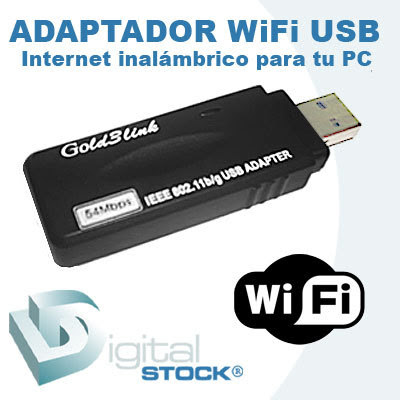
List Price USB WiFi D'Link, BlueLinx, and Tplink

List Price USB WiFi D'Link, BlueLinx, and Tplink
Wi-Fi is an Abbreviation of Wireless Fidelity, the which has a set of standards That Is Used forhttp://www.blogger.com/img/blank.gif Local Wireless Network (Wireless Local Area Networks - WLANs), the which is based on the IEEE 802.11 specification. Standard specifications of 802.11a or b, g, Such as 802.16, is currently in preparation, specifications latest offer much improvement from a wide range of more up to speed his transfer.

Wi-Fi Originally intended for the use of wireless devices and Local Area Network (LAN), but at this time more Used to access the internet. This makes someone with a computer with a wireless card (wireless card) or personal digital assistant (PDA) to the connect to the Internet using the access point (or with a known hotspot) Nearby.


List Price USB WiFi & Wireless Networking

* USB Wifi BlueLinx BL-U80G U.S. $ 15
* USB Wifi BlueLinx BL-U83G U.S. $ 5.23
* USB Wifi Tplink TL-WN321G U.S. $ 16
* USB Wifi Dlink DWA 110 U.S. $ 30
* Dlink DIR-300 Wireless Router U.S. $ 48.2

HP Mini 2102 / 10-inch Netbook Review

HP Mini 2102 / 10-inch Netbook Review
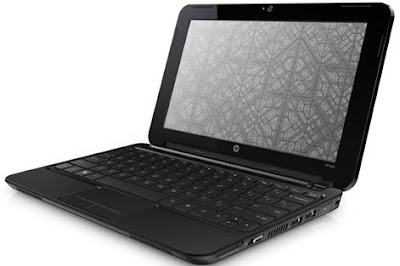
HP Mini 2102 Very rarely is a netbook officially announced any more, as it is more often revealed by another means.

The upcoming HP Mini 2102 netbook has been reveled by two sources, an Internet retailer which lists it as just $279, and HP�s very own support pages for the product.
Sitting halfway between the consumer Mini 2102 and the business Mini 5102 is the HP Mini 2102. Technically part of HP's business line, it still shares more of its DNA with the company's consumer Netbooks than with the high-end metal-clad Mini 5102 model.

HP calls it an "economical choice for mobile professionals who need a companion PC for on-the-go computing." The Mini 2102 is available in only basic black, instead of the colorful palette of hues found in HP's other Netbooks.

While the rounded edges remind us more of the HP Mini 110 and Mini 210, you still get your choice of Intel Atom N450 and N4470 processors (the latter will not be available until March), and 160, 250, or 320GB 7,200rpm hard drives.

The 10-inch display is stuck at 1,024x600-pixel resolution, unlike the Mini 5102, which can be upgraded to 1,366x768 pixels--once you've tried an HD Netbook screen, either of the 10.1- or 11.6-inch variety, it's hard to go back.

Starting at $329, the HP Mini 2102 will be available from January 7, and makes a decent entry-level business Netbook, or a more buttoned-down low-cost consumer companion PC.


Source : [http://ces.cnet.com/8301-31045_1-10423927-269.html]

Sony Vaio VPCZ116GG 13.1 inch Laptop Review

Review
Sony Vaio VPCZ116GG is a slim and stylish laptop featuring Genuine Windows� 7 Professional Operating System, Wireless connection, High Speed USB 2.0, Bluetooth, Camera, Intelligent Touchpad, Built-in stereo speakers and Built-in monaural microphone.


Sony Vaio VPCZ116GG features:

* Genuine Windows� 7 Professional 64-bit
* Intelligent Touchpad
* Intel� HM57 Express Chipset
* High Speed USB 2.0


Specifications:

Processor Intel� Core� i5-540M Processor 2.53 GHz with Turbo Boost up to 3.06 GHz*1
Operating System Genuine Windows� 7 Professional 64-bit
Chipset Intel� HM57 Express Chipset
Memory 6 GB DDR3 SDRAM*2 (upgradeable up to 8 GB*3)
Display 13.1 (33.3 cm) wide (WXGA++: 1600 x 900) TFT color display
Optical Disk Drive DVD�RW/�R DL/RAM Drive
Graphics Accelerator NVIDIA� GeForce� GT 330M GPU with CUDA� Technology (SPEED MODE) / Intel� Graphics Media Accelerator HD (STAMINA MODE)
Dimensions (WxHxD) 314 x 23.8-32.7 x 210 mm
Weight 1.38 kg
Camera Front Side Camera � Effective pixels: 640 x 480
Keyboard Approx. 19 mm key pitch/2 mm keystroke , 82keys , Backlit Keyboard
Bluetooth Bluetooth standard Ver. 2.1+EDR
Others Intelligent Touchpad, Built-in stereo speakers, Built-in monaural microphone


[Via]