Tuesday, 8 February 2011
Welcome to the family - iPhone 4 Verizon
TinyUmbrella has been updated to support iPhone 4 CDMA aka Verizon. Note that since I do not have a Verizon iPhone 4, support is BETA. Please don't be surprised if I need to post another update with findings that are sure to come... Enjoy!

Monday, 7 February 2011
Bing Copying Google Results?
 The official Google Blog has this post on how Microsoft is copying Google results for failed Bing searches. Its is very interesting reading. The evidence seems to be quite damning.
 However, I am not sure what Google can really do about it. Bringing attention to the issue seems to be about it.
Sunday, 6 February 2011
Control Flash Light, function as a torch.
The method Camera.setParameters() was introduced since Android API level 5. Using this method with parameters.setFlashMode(Parameters.FLASH_MODE_TORCH), we can control the build-in flash light of Android device as a torch.

Modify main.xml to have a button to toggle torch on/off.
main code
Modify AndroidManifest.xml to grant permission of "android.permission.CAMERA".
 Download the files.

Modify main.xml to have a button to toggle torch on/off.
<?xml version="1.0" encoding="utf-8"?>
<LinearLayout xmlns:android="http://schemas.android.com/apk/res/android"
    android:orientation="vertical"
    android:layout_width="fill_parent"
    android:layout_height="fill_parent"
    >
<TextView
    android:layout_width="fill_parent"
    android:layout_height="wrap_content"
    android:text="@string/hello"
    />
<Button
    android:id="@+id/flashcontrol"
    android:layout_width="fill_parent"
    android:layout_height="wrap_content"
    />
</LinearLayout>
main code
package com.exercise.AndroidFlashLight;

import android.app.Activity;
import android.hardware.Camera;
import android.hardware.Camera.Parameters;
import android.os.Bundle;
import android.view.View;
import android.widget.Button;

public class AndroidFlashLight extends Activity {

 Camera camera = null;
 Parameters parameters;

    /** Called when the activity is first created. */
    @Override
    public void onCreate(Bundle savedInstanceState) {
        super.onCreate(savedInstanceState);
        setContentView(R.layout.main);

        final Button FlashLightControl = (Button)findViewById(R.id.flashcontrol);
        FlashLightControl.setText("Set FLASH_MODE_TORCH");

        FlashLightControl.setOnClickListener(new Button.OnClickListener(){

   @Override
   public void onClick(View arg0) {
    // TODO Auto-generated method stub
    if(camera == null){
     camera = Camera.open();
     parameters = camera.getParameters();
     parameters.setFlashMode(Parameters.FLASH_MODE_TORCH);
     camera.setParameters(parameters);
     FlashLightControl.setText("Set FLASH_MODE_OFF");
    }else{
     parameters.setFlashMode(Parameters.FLASH_MODE_OFF);
     camera.setParameters(parameters);
     camera.release();
     camera = null;
     FlashLightControl.setText("Set FLASH_MODE_TORCH");
    }

   }});
    }
}
Modify AndroidManifest.xml to grant permission of "android.permission.CAMERA".
<?xml version="1.0" encoding="utf-8"?>
<manifest xmlns:android="http://schemas.android.com/apk/res/android"
      package="com.exercise.AndroidFlashLight"
      android:versionCode="1"
      android:versionName="1.0">
    <application android:icon="@drawable/icon" android:label="@string/app_name">
        <activity android:name=".AndroidFlashLight"
                  android:label="@string/app_name">
            <intent-filter>
                <action android:name="android.intent.action.MAIN" />
                <category android:name="android.intent.category.LAUNCHER" />
            </intent-filter>
        </activity>

    </application>
    <uses-sdk android:minSdkVersion="7" />
    <uses-permission android:name="android.permission.CAMERA"/>
</manifest>
Friday, 4 February 2011
Get system screen brightness
Last exercise describe how to "Change system screen brightness". If you want to get the current setting of system screen brightness, you can use the code:
        try {
   curBrightnessValue=android.provider.Settings.System.getInt(
     getContentResolver(), android.provider.Settings.System.SCREEN_BRIGHTNESS);
  } catch (SettingNotFoundException e) {
   // TODO Auto-generated catch block
   e.printStackTrace();
  }
Prevent iPhone 4 Baseband Update - iOS 4.2.1 iPhone 4 *ONLY*
I've added a page to the blog specifically for helping folks update to iOS 4.2.1 on their iPhone 4 while protecting their baseband. Note, this will not downgrade your baseband. All it will do is PREVENT your baseband from being updated. Enjoy!
Also - I've updated TinyUmbrella for 4.3b3 support as well as a nifty bugfix. (Thanks RobRedbeard)
Also - I've updated TinyUmbrella for 4.3b3 support as well as a nifty bugfix. (Thanks RobRedbeard)
Thursday, 3 February 2011
Change system screen brightness, using android.provider.Settings.System.SCREEN_BRIGHTNESS
Last exercise "Change Android Screen Brightness, LayoutParams.screenBrightness" for my app only. On order to change system screen brightness, we can use the code:
android.provider.Settings.System.putInt(getContentResolver(),
android.provider.Settings.System.SCREEN_BRIGHTNESS,
SysBackLightValue);
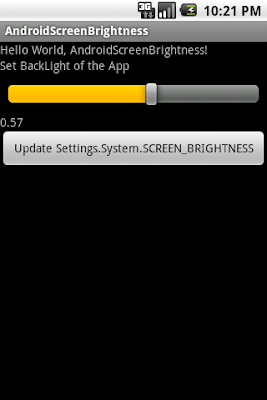
To access Settings.System.SCREEN_BRIGHTNESS, we have to modify AndroidManifest.xml to grant premission of "android.permission.WRITE_SETTINGS".
main code
main.xml
Download the files.
Related article:
- Get system screen brightness
android.provider.Settings.System.putInt(getContentResolver(),
android.provider.Settings.System.SCREEN_BRIGHTNESS,
SysBackLightValue);

To access Settings.System.SCREEN_BRIGHTNESS, we have to modify AndroidManifest.xml to grant premission of "android.permission.WRITE_SETTINGS".
<?xml version="1.0" encoding="utf-8"?>
<manifest xmlns:android="http://schemas.android.com/apk/res/android"
    package="com.exercise.AndroidScreenBrightness"
    android:versionCode="1"
    android:versionName="1.0">
  <application android:icon="@drawable/icon" android:label="@string/app_name">
      <activity android:name=".AndroidScreenBrightness"
                android:label="@string/app_name">
          <intent-filter>
              <action android:name="android.intent.action.MAIN" />
              <category android:name="android.intent.category.LAUNCHER" />
          </intent-filter>
      </activity>

  </application>
  <uses-sdk android:minSdkVersion="4" />
<uses-permission android:name="android.permission.WRITE_SETTINGS"/>
</manifest>
main code
package com.exercise.AndroidScreenBrightness;

import android.app.Activity;
import android.os.Bundle;
import android.view.View;
import android.view.WindowManager;
import android.widget.Button;
import android.widget.SeekBar;
import android.widget.TextView;

public class AndroidScreenBrightness extends Activity {
  /** Called when the activity is first created. */

float BackLightValue = 0.5f; //dummy default value

  @Override
  public void onCreate(Bundle savedInstanceState) {
      super.onCreate(savedInstanceState);
      setContentView(R.layout.main);

      SeekBar BackLightControl = (SeekBar)findViewById(R.id.backlightcontrol);
      final TextView BackLightSetting = (TextView)findViewById(R.id.backlightsetting);
      Button UpdateSystemSetting = (Button)findViewById(R.id.updatesystemsetting);

      UpdateSystemSetting.setOnClickListener(new Button.OnClickListener(){

  @Override
  public void onClick(View arg0) {
   // TODO Auto-generated method stub

   int SysBackLightValue = (int)(BackLightValue * 255);

   android.provider.Settings.System.putInt(getContentResolver(),
     android.provider.Settings.System.SCREEN_BRIGHTNESS,
     SysBackLightValue);

  }});

      BackLightControl.setOnSeekBarChangeListener(new SeekBar.OnSeekBarChangeListener(){

  @Override
  public void onProgressChanged(SeekBar arg0, int arg1, boolean arg2) {
   // TODO Auto-generated method stub
   BackLightValue = (float)arg1/100;
   BackLightSetting.setText(String.valueOf(BackLightValue));

   WindowManager.LayoutParams layoutParams = getWindow().getAttributes();
   layoutParams.screenBrightness = BackLightValue;
   getWindow().setAttributes(layoutParams);


  }

  @Override
  public void onStartTrackingTouch(SeekBar arg0) {
   // TODO Auto-generated method stub

  }

  @Override
  public void onStopTrackingTouch(SeekBar arg0) {
   // TODO Auto-generated method stub

  }});
  }
}
main.xml
<?xml version="1.0" encoding="utf-8"?>
<LinearLayout xmlns:android="http://schemas.android.com/apk/res/android"
  android:orientation="vertical"
  android:layout_width="fill_parent"
  android:layout_height="fill_parent"
  >
<TextView
  android:layout_width="fill_parent"
  android:layout_height="wrap_content"
  android:text="@string/hello"
  />
<TextView
  android:layout_width="fill_parent"
  android:layout_height="wrap_content"
  android:text="Set BackLight of the App"
  />
<SeekBar
  android:id="@+id/backlightcontrol"
  android:layout_width="fill_parent"
  android:layout_height="wrap_content"
  android:layout_margin="10px"
  android:max="100"
  android:progress="50"
  />
<TextView
  android:layout_width="fill_parent"
  android:layout_height="wrap_content"
  android:id="@+id/backlightsetting"
  android:text="0.50"
  />
<Button
  android:id="@+id/updatesystemsetting"
  android:layout_width="fill_parent"
  android:layout_height="wrap_content"
  android:text="Update Settings.System.SCREEN_BRIGHTNESS"
  />
</LinearLayout>
Related article:
- Get system screen brightness
Subscribe to:
Posts (Atom)