 The Verge has a story on a new battery technology that could supplant the iron grip of Lithium Ion batteries. The new technology is called Iolyte, and has a number of advantages:
- It is not flammable
- It holds 10 times the charge given the same size
The Verge has a story on a new battery technology that could supplant the iron grip of Lithium Ion batteries. The new technology is called Iolyte, and has a number of advantages: Here is another coming Ultrabook with a Matte display! The Lenovo X1 Carbon is a 14 inch ultralight that weights under 3 lbs. I ran across this a couple of weeks back, but I didn't have time to write about it.CNET has a writeup on the fist wave of Ultrabook laptops. These are part of an Intel program to design Windows based laptops to compete with the MacBook Air.
 Best Buy has a deal on a Lenovo laptop for only $299. The sales runs through Wed 10/5 only.This is the first in a new series on laptops with a matte finish. If you are like me and spend most of your day in front of a computer, you know how nice it is to have a matte finish. Briefly, a matte finish display reduces glare from other light sources, especially natural light. When turned off, an anti-glare matte display looks dark with little or no reflection. Contrast that with today's ultra bright displays that when turned off look like a mirror. This super reflectivity can lead to eye strain and headaches in some people. However, the new bright displays do look good in showrooms and thusly are very popular with many retailer today.
 Ever since HP made its shocking announcement about the TouchPad and its PC business I have been worndering about this question.
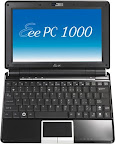
Well as you may have guessed from an earlier post, I splurged and got myself an eee PC 1000 last week. If you aren't familiar with the eee, its a line of ultra portable laptops from Asus. The machines generally weigh less than 3 pounds and can cost as little as $350. The more inexpensive models have a very small 7 inch screen, small keyboard, and limited disk storage.
The eee 1000 has a 10 inch screen with a 1024x600 resolution, a 40gig solid state hard drive (SSD), and a fairly good sized keyboard. In addition, the 1000 uses the new very power efficient Intel Atom processor. Although at $670, the 1000 isn't exactly cheap, it is a pretty good price considering what you get (the SSD being a prime example). And its really inexpensive if you compare it to the $1800 starting price of a Macbook Air.
Here are some of my first impressions after a week
Overall I am quite impressed with this little machine. If you are interested in trying an ultra portable, but don't want to mortgage the house, give the eee pc 1000 a look.

For geeks, the eee pc leaves off a couple vital utilities from its user interface. Namely a terminal and a text editor. Now you can get to a terminal by typing Cntl-Alt-t or by launching one from the eee File manager. But the built in terminal uses a very small font and does not seem to be configurable. The file manager uses KDE's konsole, which works great, but I need a quicker way to get to it.
After searching around I bit, I discovered you can add a start menu to the eee's user interface. This seems to be the easiest and most unobtrusive way to add some simple customization to the eee. The steps are described on the LinuxOSS blog. Basically they are
mkdir /home/user/.icewmcp /etc/X11/icewm/preferences /home/user/.icewm/cp /etc/X11/icewm/menu /home/user/.icewm/vi /home/user/.icewm/preferences to edit the file. If you don't know how to use vi, you should learn to. :)Now you can edit the /home/user/.icewm/menu file and customize the menu. The basic structure for each menu item is: prog �title� icon_name program_path. So to add the Konquerer text editor, I would add a line: prog �Text Editor� kwrite /usr/bin/kwrite. Voila! I know have a link to the kwrite editor on the start menu.
The first question I had after add a few test entries was, where do you get the icons for your applications? It must be getting a kwrite icon from somemplace? By default, the eee looks for icons in the /usr/share/pixmaps directory. If you navigate there you will see a number of icons. You can reuse these for most of your applications. In addition, more icons can be found at /opt/xandros/share/AsusLauncher, but you will need to put in the full path icons in this directory.
Well after getting transferred 3 times, the first two people didn't know what a 2133 was, I finally got someone who "attempted" to "solve" my problem. I explained that there seemed to be no network repository for packages installed with Suse Linux 10 and was wondering what the URL was for one I could use. This is the answer I got:
I pointed out to the nice HP support lady that I received no Suse OS disk with the system. Where could I find such a disk? She restated 1 and reiterated 2.
Well at this point, there is no point in wasting anymore of her or my time. I thanked her and hung up. I had pretty low expectations but this exceeded them. Wow! Thanks a lot HP.
Since I have had the 2133, it seems to randomly lock up occasionally (its the software config, not the hardware). After one of these crashes, the Suse auto login stopped working and now I have to log in from the command prompt and do a "startx". In addition, the shutdown features no longer seem to work from inside the desktop (Have to drop to root. Shutdown and then do an init 0 from single user mode). This started happening while I was waiting on hold. It's setups like this that give Linux a bad name. Crap like this used to happen when I tried to use Redhat and never happen now that I use Ubuntu.
The moral of the story, only use a Linux that you can get community support for. Looks like its Ubuntu time. Installation instructions for Ubuntu and the HP2133 can be found at: https://wiki.ubuntu.com/LaptopTestingTeam/HP2133. So much for trying Suse Linux. :(
I don't have time at the moment to setup Ubuntu. This will probably have to wait until early July when I have some vacation. But at least I know I will get support from that community.
I purchased an HP mini note 2133 laptop just before I left for my trip. This is an ultra notebook about the size of your standard tech paperback book and weighs about 3lbs. It is pretty nice. The 9" screen is small but readable with a resolution of 1280x768. Much better than what you will find with most ultra portables like it. In addition, the keyboard is 90% of the normal size so it is still pretty big. Having seen an eee pc at Rails Conf, I am not sure I could type on that. The keyboard on the mini note is not a problem.
I purchased the Linux version with 1gig of ram and a 120G hard drive from newegg for about $550 like the one you see below. Apparently Amazon is going to get a few of these in sometime.
The main problem I have to date is the Suze Linux installed with the system looks for a DVD ROM drive for additional software packages. This is a bit humorous since the mini note has no DVD or CDROM drive. HP. Don't you think it would be better for this system to look at some network repository for packages? Maybe? lol. You can't make this stuff up.
I found a DVD image on the HP support site. I am downloading that to see if it has some of the packages I want. Really, I just want to add Apache, PHP5, and Ruby. Maybe Thunderbird, SQLite. Just stuff I can play around with when I am bored. Gonna call too to see if they can give me some sort of network URL.
Now I know most Linux geeks are gonna say, just wipe the sucker and install Ubuntu. I have thought about that, but I'm not that good of a Linux geek and I don't really want to take the time. Heck it would be nice to use another distro just to see what it is like.
I will update you on my progress.
Well, looks like I'm not gonna get that Dell Linux laptop after all. Last week, after requesting they continue with my order, they canceled it anyway. I called customer service to see what the hold up was. The lady in India I talked to said they could look that sort of thing up, but their systems were down and would be for about an hour. Oh well.
I did a little of my own investigation and it appears they are no longer offering the nonglare screen that I ordered. That would explain the long delays. However, why not tell me that I needed to choose a different screen option? Like the first week? Or any week? Why give me no info for a month and a half? In the end, Dell ended up calling me about 8 times and e-mailing me about a dozen times about this order. My guess is, they probably lost about the price of the laptop in labor costs related to telling me my system was back ordered. And in the end, they lost my business altogether.
I was thinking of still getting a Dell laptop, until I ran across the eee PC 900 stories. This is a new version of the Linux Ultra Portable that has a 9" screen with a 1024x600 resolution. Much more usable than the 7" version. Check out a YouTube review here:
http://www.youtube.com/watch?v=aY2azHo0LAU
So basically, you get a machine very similar in function to a MacBook Air for about $500, maybe a little less, maybe a little more. Beats the heck out of $1700. The extra style is not worth $1200.
Anyhoo, I'll be grabbing one of these babies as soon as they are available. More to come once I get one.
Thanks to Digg for the pointer to this story on the Everex Cloudbook laptop which is a 7 inch ultra portable just like the Eee. Coming soon to a Walmart near you January 20. They will also have a $399 regular 15.4 inch laptop running the gOS Linux.
And I would be remiss if I didn't mention this CNet story on Shuttle offering a $199 Linux PC.
All our office apps are moving to the Web. As the first story points out, one wonders how long people will overpay for Vista PCs when they really only need one of these Linux solutions. A couple of years methinks, but it will happen.
